Freestyle Canada
Submit a request
Home > Android

Articles in this section

  • How do I add content to my training plan?
  • How do I cancel my Freestyle Ski Canada subscription on Android?
  • How do I create a team?
  • How do I create a training plan?
  • How do I create an account?
  • How do I delete a training plan?
  • How do I download an article or video?
  • How do I download the Freestyle Ski Canada app on Android?
  • How do I invite and add a team member?
  • How do I join a team?
  • How do I navigate through the app on Android?
  • How do I save and view my favorite videos and articles?
  • How do I search for a video or article?
  • How do I share a Training Plan?
  • How do I switch languages in the app?
  • How do I view the app in French?
  • I forgot my password. How can I reset it?
  • I want to subscribe or become a member of Freestyle Ski Canada, but I don’t have an access code. What should I do?
  • I’m experiencing issues with the app. How can I get help?
  • Where can I view my shared content?

How do I download the Freestyle Ski Canada app on Android?

The Freestyle Ski Canada app works on Android devices running version 4.1 (Jelly Bean) or higher.

  • Open the Google Play Store on your device.
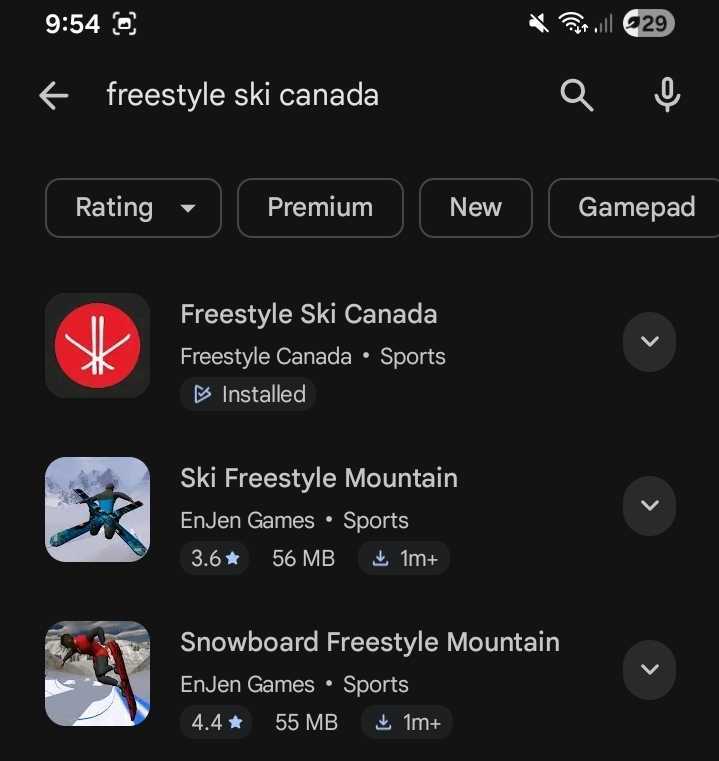
Search for the App
Search for the App
  • Tap the search bar at the top and type “Freestyle Ski Canada”.
  • Select the Freestyle Ski Canada app from the search results.
  • Tap the Install or Open button.
Install Freestyle Ski Canada

Once the app has finished downloading, tap Open to start using it.


Was this article helpful?

Still need help?Submit A Ticket

Recently Viewed

  • Article 1
  • Article 2
  • Article 3

Articles in this section

  • How do I add content to my training plan?
  • How do I cancel my Freestyle Ski Canada subscription on Android?
  • How do I create a team?
  • How do I create a training plan?
  • How do I create an account?
  • How do I delete a training plan?
  • How do I download an article or video?
  • How do I download the Freestyle Ski Canada app on Android?
  • How do I invite and add a team member?
  • How do I join a team?
  • How do I navigate through the app on Android?
  • How do I save and view my favorite videos and articles?
  • How do I search for a video or article?
  • How do I share a Training Plan?
  • How do I switch languages in the app?
  • How do I view the app in French?
  • I forgot my password. How can I reset it?
  • I want to subscribe or become a member of Freestyle Ski Canada, but I don’t have an access code. What should I do?
  • I’m experiencing issues with the app. How can I get help?
  • Where can I view my shared content?

Comments

Freestyle Canada © 2026